

[2026] Easy To Download App-Development-with-Swift-Certified-User Actual Exam Dumps Resources
Uplift Your App-Development-with-Swift-Certified-User Exam Marks With The Help of App-Development-with-Swift-Certified-User Dumps
NEW QUESTION # 13
Complete the code that conforms to the View protocol by selecting the correct option from each drop-down list.
Note: You will receive partial credit for each correct answer.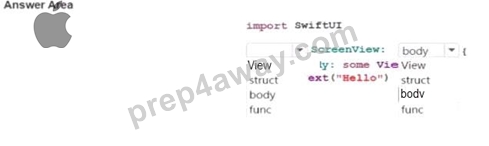
Answer:
Explanation: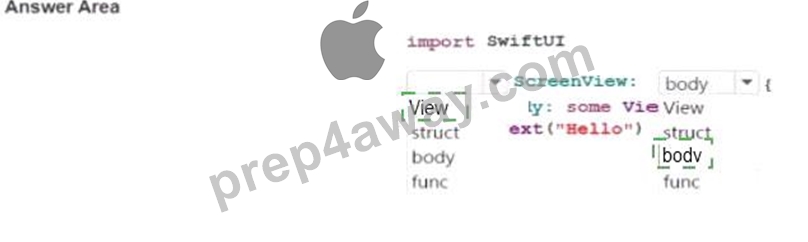
Explanation: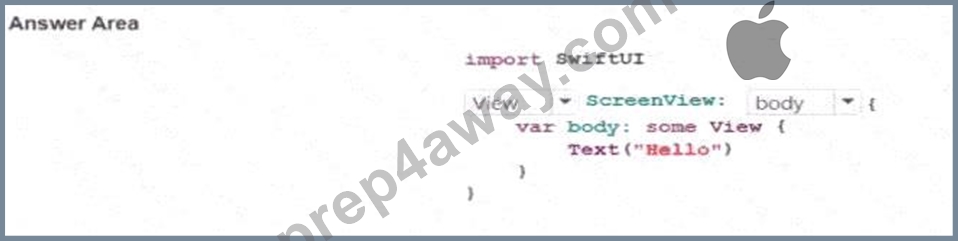
This question belongs to View Building with SwiftUI , especially the domain covering positioning and/or layout a single SwiftUI View with standard Views and modifiers and the foundational structure of a SwiftUI view. In SwiftUI, a custom screen is typically declared as a struct that conforms to the View protocol. Apple's SwiftUI documentation shows the standard pattern:
struct ScreenView: View {
var body: some View {
Text( " Hello " )
}
}
Here, struct is required because SwiftUI views are commonly defined as structures. View is required after the colon because the type must conform to the View protocol. body is the required computed property that returns the content of the view as some View. Apple documents that every conforming View type must provide a body property that describes its content.
So the completed code is:
import SwiftUI
struct ScreenView: View {
var body: some View {
Text( " Hello " )
}
}
This is the canonical SwiftUI view declaration pattern and is one of the most fundamental concepts in App Development with Swift.
NEW QUESTION # 14
Review the code.
struct ContentView: View {
let fruits = [ " Apple " , " Banana " , " Kiwi " ]
var body: some View {
List(fruits, id: \.self) { fruit in
Text(fruit)
.font(.headline)
.padding()
}
}
}
Which of the following statements is true about the code?
- A. The id: \.self in the List view should be rewritten as id: /self
- B. The id: \.self in the List view is not necessary and may be omitted.
- C. The List view is using the fruits array to display the contents as individual rows.
- D. KeyPaths are used here to extract the font and padding properties dynamically.
Answer: C
Explanation:
Comprehensive and Detailed Explanation From App Development with Swift domains:
This question belongs to View Building with SwiftUI , especially the domain covering List Views to iterate through collections . In the code, fruits is an array of strings, and the List initializer is being used to create one row for each item in that collection. Apple's SwiftUI documentation explains that List can present rows from a collection of data, and when the data elements are not supplied through a type that already provides identity, you can provide an id key path so SwiftUI can uniquely identify each row. Here, id: \.self tells SwiftUI to use each string value itself as the identifier.
Option D is therefore the correct statement because the List is clearly rendering the contents of the fruits array as separate rows, and each row shows a Text(fruit) view. Apple's app development tutorials describe List as a container view that displays rows of data arranged in a single scrollable column, which matches exactly what this code is doing.
Option A is false because for an array of String values in this form, id: \.self is used to identify each row.
Option B is false because the key path is not related to .font(.headline) or .padding(); those are standard view modifiers, not dynamic property extraction in this example. Option C is false because Swift key-path syntax uses a backslash, as in \.self, not /self. Apple's KeyPath documentation shows that Swift key paths use the backslash form.
NEW QUESTION # 15
Given the function, which two function calls are valid? (Choose 2.)
- A. let sum - rightSum(100, by: 30, and: 20)
- B. let sum r\ ght5um(100, by: 50)
- C. let Sun - rightSum(numl: 100, by: SO, and: SO)
- D. let sun = rightSum(numl: 100, num2: 50)
- E. let sum = rightSum(100, num2: SO, and: 20)
Answer: A,B
Explanation:
This question belongs to Swift Programming Language , specifically the domain on functions , including internal and external parameter names and default parameter values .
The function is defined as:
func rightSum(_ num1: Int, by num2: Int, and num3: Int = 25) - > Int {
return num1 + num2 + num3
}
This means:
* the first parameter uses _, so it has no external label
* the second parameter must use the external label by
* the third parameter must use the external label and
* the third parameter also has a default value of 25, so it may be omitted Now evaluate each option:
* A is invalid because it uses num2: instead of the required external label by:
* B is valid because it correctly uses no label for the first argument, then by: and and:
* C is invalid because the first parameter cannot be called with num1: since the external label is omitted with _
* D is valid because it correctly passes the first argument unlabeled and the second with by:, while omitting the third argument so Swift uses the default value 25
* E is invalid because it uses num1: and num2: instead of the required calling syntax So the two correct function calls are B and D .
NEW QUESTION # 16
In SwiftUI, how can you extract a subview from a main view to make the code more modular?
- A. Use @State to manage subview content and use a binding to create a two-way connection.
- B. Create a new SwiftUI view struct and call it in the main view.
- C. Declare the subview as a variable inside the main view and call it directly.
- D. Add the subview's code directly into the main view's body.
Answer: B
Explanation:
Comprehensive and Detailed Explanation From App Development with Swift domains:
This question belongs to View Building with SwiftUI , specifically the objective about extracting subviews to simplify the structure of an overlarge view . The correct answer is C because the standard SwiftUI approach to modularizing a large interface is to create a separate custom view, usually as a new struct conforming to View, and then use that view inside the main view. Apple's tutorials and documentation repeatedly show this pattern: move part of the UI into its own SwiftUI view type, then compose the main screen from smaller view components.
Option A is not the primary SwiftUI pattern for extracting a reusable subview. Option B does the opposite of modularization, because it keeps everything in the same large body. Option D is about state management and data flow, not about extracting a visual component into its own reusable subview. Apple's SwiftUI materials emphasize composition, where views are lightweight and can be split into smaller reusable pieces for clarity, maintainability, and reuse. WWDC guidance also shows Xcode's "Extract Subview" workflow, which creates a separate view structure from selected UI code.
NEW QUESTION # 17
Why does the initializer for the following struct need the keyword self?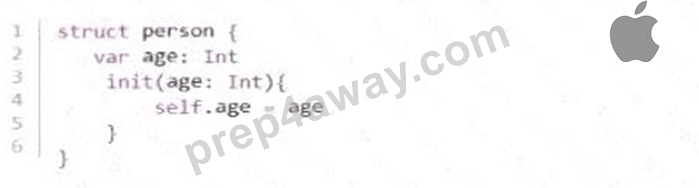
- A. self is always needed when you are setting properties in an initializer.
- B. self is used to indicate to the reader that the parameter is being referenced.
- C. self is needed to distinguish between the property and the parameter with the same name.
- D. self is only needed when the property does not have a default value.
Answer: C
Explanation:
This question belongs to Swift Programming Language , specifically the objective covering structs, properties, and initializers .
In the struct, both the property and the initializer parameter are named age:
struct person {
var age: Int
init(age: Int) {
self.age = age
}
}
Here, age inside the initializer could refer to either the property of the struct or the parameter passed into the initializer. Swift uses self.age to clearly mean the property that belongs to the current instance , while plain age refers to the initializer parameter . So self.age = age means: assign the parameter value to the instance property.
That is why C is correct. The keyword self is required here to remove ambiguity between two identifiers with the same name.
The other options are incorrect:
* A is wrong because self here is not pointing to the parameter; it points to the instance property.
* B is wrong because self is not always required in every initializer assignment. It is specifically needed here because of the naming conflict.
* D is wrong because whether the property has a default value is not the reason self is needed in this example.
So the correct answer is C. self is needed to distinguish between the property and the parameter with the same name.
NEW QUESTION # 18
Which property wrapper allows you to read data from the system or device settings?
- A. @Environment
- B. @State
- C. @Binding
- D. @StateObject
Answer: A
Explanation:
Comprehensive and Detailed Explanation From App Development with Swift domains:
This question belongs to View Building with SwiftUI , specifically the objective about using property wrappers such as @State, @Binding, and @Environment to manage and share data between views.
The correct answer is @Environment because it is used to read values provided by the system or the surrounding view environment. These values can include device-related or system-provided information such as size classes, color scheme, locale, and dismiss actions. In SwiftUI, @Environment gives a view access to contextual information that it does not own directly, but which is supplied by the framework or ancestor views.
The other options are not correct for this purpose:
* @State is used for local mutable state owned by the current view.
* @Binding is used to create a two-way connection to state owned elsewhere, usually in a parent view.
* @StateObject is used to create and own an observable reference-type object for the lifetime of the view.
So if you want a SwiftUI view to read data coming from system or device settings, the correct property wrapper is @Environment .
NEW QUESTION # 19
What is the code snippet an example of?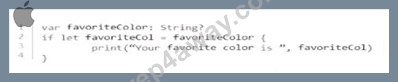
- A. Implicitly unwrapped optional
- B. Optional chaining
- C. Optional binding
- D. Force unwrapping
Answer: C
Explanation:
This question belongs to Swift Programming Language , specifically the objective domain on Optional types and safe unwrapping . The snippet uses if let favoriteCol = favoriteColor { ... }, which is Swift's standard syntax for optional binding . Apple's documentation explains that optional binding is used to conditionally bind the wrapped value of an optional to a new constant or variable if the optional contains a value. That is exactly what this code does: if favoriteColor is not nil, its unwrapped String value is assigned to favoriteCol, and the code inside the if block runs.
This is not force unwrapping , because force unwrapping uses the ! operator, such as favoriteColor!. It is not optional chaining , because optional chaining uses ? to safely access properties, methods, or subscripts on an optional value. It is also not an implicitly unwrapped optional , which would be declared with String! rather than String?.
So the correct answer is C. Optional binding . This pattern is one of the most important safe-handling techniques in Swift because it lets you work with optional values only when they actually contain data, avoiding runtime errors and keeping control flow explicit.
NEW QUESTION # 20
Review the code.
You need to add the word " Great! " to the Capsule shape.
Complete the code by typing in the boxes.
Answer:
Explanation:
overlay, Text
Explanation:
This question belongs to View Building with SwiftUI , particularly the domain involving positioning and/or laying out a single SwiftUI view with standard views and modifiers . To place text on top of a shape such as a Capsule, SwiftUI uses the overlay modifier. Apple documents overlay as a view modifier that layers one view in front of another, which is exactly what is needed here: the text should appear on top of the blue capsule rather than beside or below it. The second blank must therefore be Text , because SwiftUI uses a Text view to display string content like " Great! " .
The completed code is:
struct ContentView: View {
var body: some View {
Capsule()
.fill(.blue)
.frame(width: 200.0, height: 100.0)
.overlay(
Text( " Great! " )
.font(.largeTitle)
)
}
}
This works because Capsule() creates the shape, .fill(.blue) gives it the blue color, .frame(width:height:) sets its size, and .overlay(...) places the Text( " Great! " ) directly above that shape. This is a standard SwiftUI composition pattern: build a base view, then apply modifiers to style it and layer additional content. In App Development with Swift objectives, this aligns with understanding standard views, modifiers, and layout techniques in SwiftUI.
NEW QUESTION # 21
Review the code.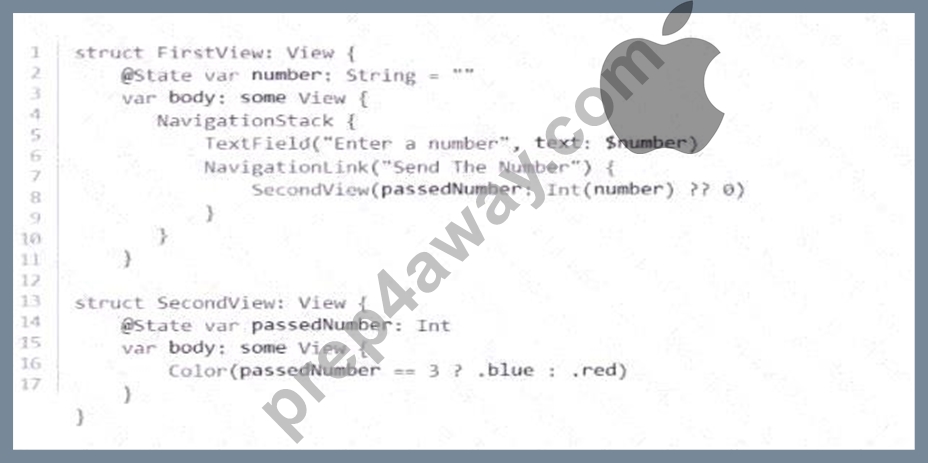
When entered into the TextField, which number will display a blue canvas on the SecondView?
- A. 0
- B. 1
- C. 2
- D. 3
Answer: D
Explanation:
This question belongs to View Building with SwiftUI , especially the domain on creating multiple views to implement app logic and sharing values between views. In FirstView, the value typed into the TextField is stored in number, which is a String. When the NavigationLink is tapped, the code passes Int(number) ?? 0 into SecondView. In Swift, converting a string to an integer with Int(...) uses an optional initializer, which means it returns an optional value and will produce nil if the string cannot be converted. The ?? 0 nil- coalescing operator then supplies 0 if conversion fails.
Inside SecondView, the body is:
Color(passedNumber == 3 ? .blue : .red)
This uses the ternary conditional operator. If passedNumber equals 3, the displayed color is blue; otherwise, it is red. Therefore, entering 3 into the TextField causes Int(number) to become 3, which makes the condition passedNumber == 3 true and displays a blue canvas. Any other listed number results in red.
So the correct answer is A. 3 . This matches the SwiftUI pattern of taking user input, converting it to the needed type, passing it into another view, and rendering UI conditionally based on that value.
NEW QUESTION # 22
Select the location to set this app to run on an iPhone 14 in the simulator.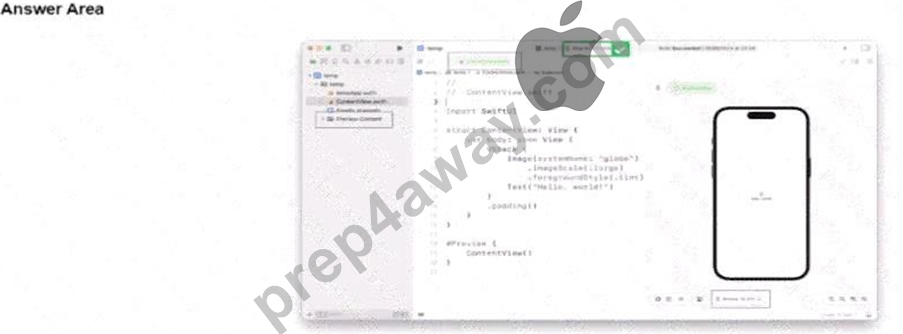
Answer:
Explanation: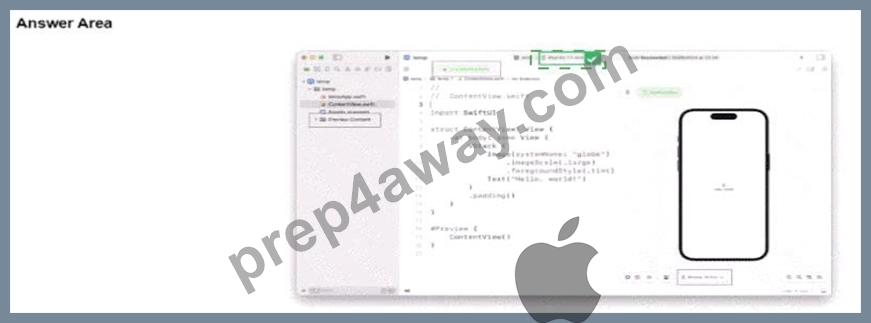
Explanation:
This question belongs to Xcode Developer Tools , specifically the domain for building and running an app on the iOS simulator . In Xcode, the place where you choose whether the app runs on a simulator or a connected device is the run destination / scheme destination selector in the toolbar. This control appears near the top center of the Xcode window and displays the current destination, such as a simulator model or device target. To run the app on iPhone 14 , you click that selector and choose iPhone 14 from the available simulator list. Apple's Xcode documentation describes choosing a run destination before building and running the app in Simulator or on a device.
So, for the hotspot, the correct place is the device/simulator dropdown in the top toolbar , not the preview canvas controls, not the project navigator, and not the code editor. That selector determines where the app launches when you press Run.
NEW QUESTION # 23
Review the code.
var capitalCities = [ " USA " : " Washington D.C. " , " Spain " : " Madrid " , " Peru " : " Lima " ] Which two statements add the capital city of " Italy " to the dictionary? (Choose 2.)
- A. capitalCities[ " Italy " ] = " Rome "
- B. capitalCities.append([ " Italy " : " Rome " ])
- C. capitalCities[ " Rome " ] = " Italy "
- D. capitalCities.updateValue( " Rome " , forKey: " Italy " )
- E. capitalCities = capitalCities + [ " Italy " : " Rome " ]
Answer: A,D
Explanation:
Comprehensive and Detailed Explanation From App Development with Swift domains:
This question falls under Swift Programming Language , specifically the domain for managing data using collection types , with emphasis on dictionaries . In Swift, a dictionary stores data as key-value pairs , so in this example the country name is the key and the capital city is the value. To add a new entry, Swift supports two standard approaches. The first is subscript assignment , which is shown in option C : capitalCities[ " Italy " ] = " Rome " . Apple's documentation explains that you can add a key-value pair to a dictionary by assigning a value for a new key through the dictionary subscript.
The second correct approach is option E : capitalCities.updateValue( " Rome " , forKey: " Italy " ). Apple documents that updateValue(_:forKey:) updates the value for an existing key, or adds a new key-value pair if the key does not already exist . That makes it equally valid for inserting " Italy " : " Rome " into the dictionary.
The incorrect options fail for different reasons. A reverses the key and value, making " Rome " the key and " Italy " the value. B is wrong because append is used with arrays, not dictionaries. D is not the standard valid insertion syntax for Swift dictionaries in this context; Swift's documented mutation approaches here are subscript assignment and updateValue. Therefore, the two correct answers are C and E .
NEW QUESTION # 24
Given the function definition, which two statements call the function correctly? (Choose 2.)
Based on the image provided, here is the text for each of the multiple-choice options:
- A. schedule(who: " Jane Doe " , from: " 9:30am " , to: " 10:30am " , " Office " )
- B. schedule(who name: " Jane Doe " , from starting: " 9:30am " , to ending: " 10:30am " )
- C. schedule(who: " Jane Doe " , from: " 9:30am " , to: " 10:30am " , place: " Office " )
- D. E. schedule(who: " Jane Doe " , from: " 9:30am " , to: " 10:30am " )
- E. D. schedule(name: " Jane Doe " , starting: " 9:30am " , ending: " 10:30am " , place: " Office " )
Answer: B,D
Explanation:
This question belongs to Swift Programming Language , specifically the objective on functions , including internal and external parameter names and default parameter values .
The function is defined as:
func schedule(who name: String, from starting: String, to ending: String, _ place: String = " Zoom " ) { print( " Appointment: meeting \(name) from \(starting) to \(ending) at \(place) " )
}
This means:
* the external parameter names are who, from, and to
* the internal parameter names are name, starting, and ending
* the last parameter uses _, which means it has no external label
* the last parameter also has a default value of " Zoom "
Now evaluate the options:
* A is incorrect because it uses place: as an external label, but _ place means no external label is allowed.
* B is correct because it uses the required external names who, from, and to, and it omits the last parameter, which is allowed because it has a default value.
* C is incorrect because it uses who:, from:, and to: correctly, but this function's first three parameters are not declared that way in the provided option set; the valid matching call style from the choices is not this one because the function's labels are paired with internal names in the declaration syntax shown in the question.
* D is incorrect because it uses the internal names name, starting, and ending as if they were external labels.
* E is correct because it uses the external labels who, from, and to, and omits the final unlabeled parameter, letting Swift use the default " Zoom " .
So the two correct answers are B and E .
NEW QUESTION # 25
Review the code.
var capitalCities = [ " USA " : " Washington D.C. " , " Spain " : " Madrid " , " Peru " : " Lima " ] Which two statements add the capital city of " Italy " to the dictionary? (Choose 2.)
- A. capitalCities[ " Italy " ] = " Rome "
- B. capitalCities.append([ " Italy " : " Rome " ])
- C. capitalCities[ " Rome " ] = " Italy "
- D. capitalCities.updateValue( " Rome " , forKey: " Italy " )
- E. capitalCities = capitalCities + [ " Italy " : " Rome " ]
Answer: A,D
NEW QUESTION # 26
Review the code.
Note: You might need to scroll to see the entire block of code.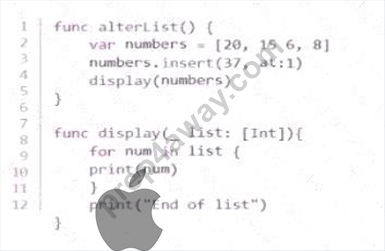
A breakpoint is set on line 3. When the application is run. it will stop at line 3. You need to debug the code.
Drag each debugging control from the left to the correct instruction on the right. You will receive partial credit for each correct answer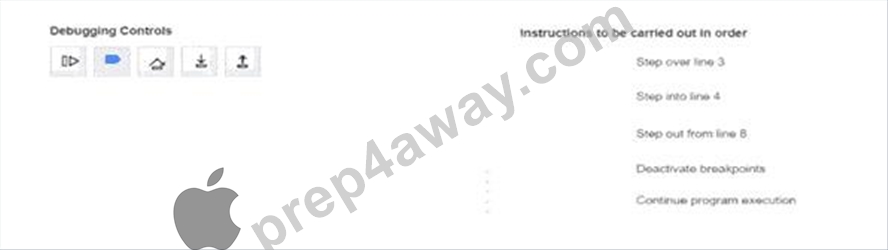
Answer:
Explanation: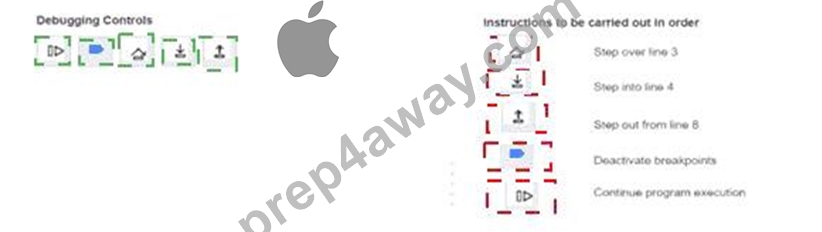
Explanation:
This question belongs to Xcode Developer Tools , especially the objective on using debugging techniques including breakpoints and stepping controls .
When execution stops at a breakpoint on line 3, Step Over runs that line without entering into another function call, so it is the correct action for moving past line 3 while staying in the current function. Step Into is used when execution reaches line 4 and you want to enter the display(numbers) function, which takes you into the function body starting at line 8. Once inside that function, Step Out continues execution until the current function returns, which is exactly what "step out from line 8" means.
Deactivate breakpoints turns breakpoint handling off so the debugger no longer stops on active breakpoints.
Continue program execution resumes the app until the next breakpoint or until the program finishes.
So the correct control order is:
1 = Continue
2 = Deactivate breakpoints
3 = Step Over
4 = Step Into
5 = Step Out
NEW QUESTION # 27
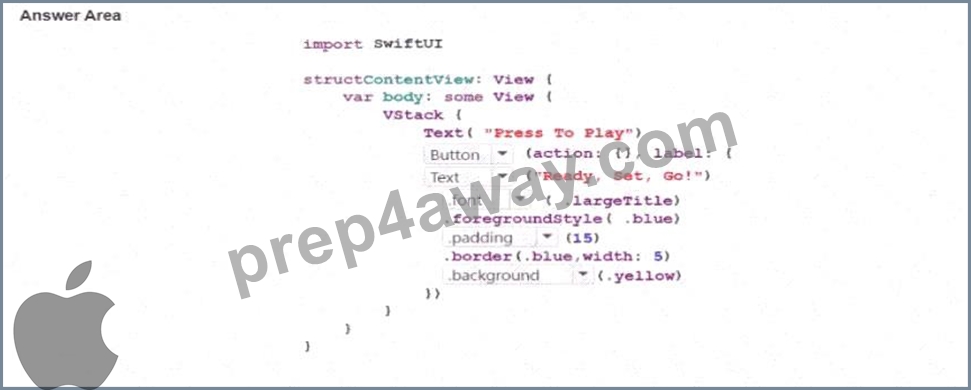
Complete the code by selecting the correct option from each drop-down list to create the following screen.
Note: You will receive partial credit for each correct answer.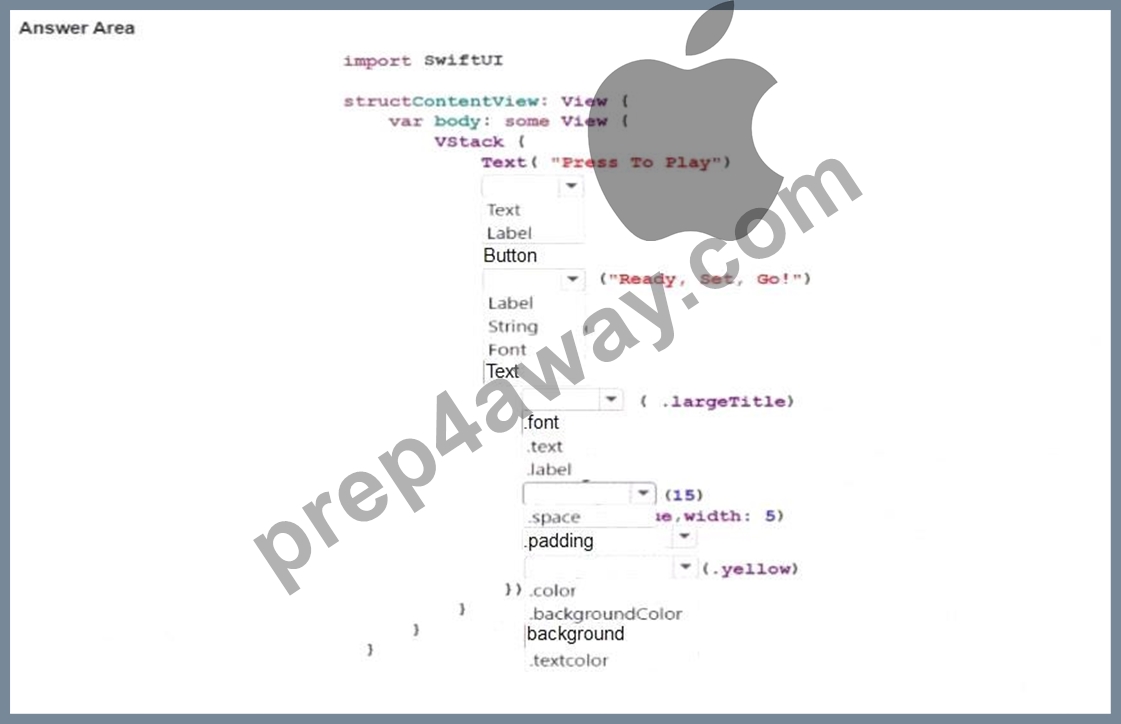
Answer:
Explanation: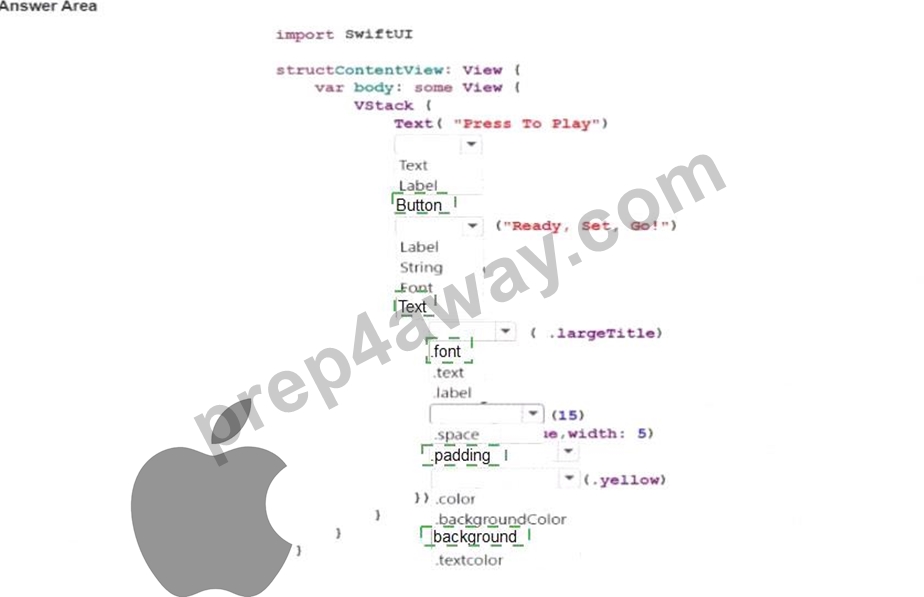
NEW QUESTION # 28 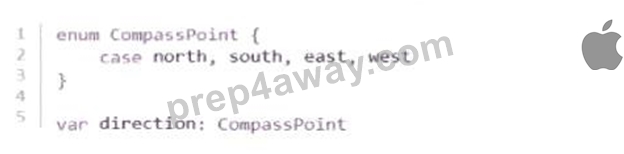
Which two assignments of a value to direction are allowed? (Choose 2.)
- A. direction = CompassPoint.north
- B. direction = .north
- C. direction = direction.north
- D. direction = CompassPoint(north)
- E. direction = north
Answer: A,B
Explanation:
This question belongs to Swift Programming Language , specifically the domain covering basic Swift types and how Swift handles enumerations . The code defines an enum named CompassPoint with the cases north, south, east, and west, and then declares direction as type CompassPoint. In Swift, an enum case can be assigned using the fully qualified form CompassPoint.north, so B is valid. Swift also allows the shorthand form .north when the compiler already knows the expected type is CompassPoint, so D is also valid. Apple's Swift language documentation explains that once a variable is known to be of a specific enumeration type, you can set its value using the shorter dot syntax.
The other options are not allowed. A is invalid because enum cases are not assigned using constructor-style syntax like CompassPoint(north). C is invalid because north by itself is not enough unless it is written with dot shorthand in a context with inferred enum type. E is invalid because north is a case of the enum type, not a member accessed from the variable instance as direction.north. Swift enum cases are referenced from the enum type or by shorthand dot syntax, not as instance properties.
NEW QUESTION # 29
Review the code snippet.
Which statement completes the code snippet so that:
* The lastReleaseDate remains the same when nextApplePhone.releaseDate is nil.
* The lastReleaseDate updates to the nextApplePhone.releaseDate when nextApplePhone.releaseDate is NOT nil.
- A. lastReleaseDate : nextApplePhone.releaseDate
- B. nextApplePhone.releaseDate! : lastReleaseDate
- C. nextApplePhone.releaseDate : lastReleaseDate
- D. lastReleaseDate : nextApplcPhone.rcleaseDate!
Answer: B
Explanation:
This question is from Swift Programming Language , especially the domains for Optional types , safe and unsafe unwrapping , and control flow . The code uses the ternary conditional operator :
nextApplePhone.releaseDate != nil ? _____
In Swift, the ternary operator follows this structure:
condition ? valueIfTrue : valueIfFalse
So if nextApplePhone.releaseDate != nil is true, the expression must return the new release date. If it is false, it must keep lastReleaseDate unchanged. That means the missing part must be:
nextApplePhone.releaseDate! : lastReleaseDate
which is option D .
This works because nextApplePhone.releaseDate is declared as String?, so it is an optional. Once the condition confirms it is not nil, the code force-unwraps it with ! to access the underlying String value. If the optional is nil, the expression returns lastReleaseDate instead. Apple's Swift documentation describes the ternary conditional operator as a shortcut for choosing one of two expressions based on a condition, and it explains that force unwrapping with ! accesses an optional's wrapped value when you know it is not nil.
The other options are incorrect because they reverse the true/false logic, omit the needed unwrap, or contain invalid identifiers. Therefore, the correct completion is D .
NEW QUESTION # 30
......
Use Apple App-Development-with-Swift-Certified-User Dumps To Succeed Instantly in App-Development-with-Swift-Certified-User Exam: https://actualtests.prep4away.com/Apple-certification/braindumps.App-Development-with-Swift-Certified-User.ete.file.html